Cvent alternative
A Cvent alternative you can start today.
EventLantern is event management software for conferences, with registration, scheduling, speakers, sponsors, check-in, and reporting in one dashboard. Pricing is public, plans are month to month, and you can start free.
The short answer: choose EventLantern if you want to see the price before you talk to anyone, avoid a multi-year contract, and run a complete conference from one clear system. Choose Cvent if you run very large, global programs or need a vendor with a long track record. Details below, dated October 2026.
Why teams look elsewhere
What usually sends people looking for a Cvent alternative.
You cannot see the price
Cvent does not publish pricing, so you need a sales conversation to learn what an event will cost. EventLantern publishes every plan.
Costs add up in layers
Third-party reports describe an annual license, per-registrant fees, and implementation costs. That is hard to justify for a single conference or a small program.
Long contracts
Multi-year, auto-renewing terms are commonly reported. EventLantern is month to month.
Setup takes time
Reviewers commonly mention training and a learning curve for new administrators. EventLantern is one dashboard that a new organizer can open and use.
Cost and contract points are drawn from third-party reports, which are estimates and not Cvent prices: Docket , InEvent , Engine , Capterra .
What you get
Public plans, month to month.
Free
$0
Get started with no credit card.
One active event, up to 50 attendees.
Starter
$49/mo
Small to mid-size events.
Three events, up to 500 attendees each.
Professional
$249/mo
Several events at scale.
Unlimited events, up to 5,000 attendees each.
Stripe charges its own processing fees on paid tickets. EventLantern adds no markup. See every plan and limit.
Honest fit
Where Cvent may be the better choice.
-
Very large or global programs
If you run events with tens of thousands of attendees across many regions and languages, Cvent has years of experience at that scale. EventLantern handles up to 5,000 attendees per event today.
-
A long vendor track record
Cvent is an established vendor with a large customer base and a long procurement history. EventLantern is a newer company. If your buying process requires a vendor of that age, Cvent meets it and we do not yet.
-
Deep enterprise procurement needs
If you need custom contracts, dedicated account management, or a bundled suite beyond events, Cvent is built for that buying model.
Want the full side-by-side? Read EventLantern vs Cvent.
Switching
Move over at your own pace.
Start free alongside your current setup
Create an event on the free plan while your current platform keeps running. Nothing is cancelled until you are ready.
Import your Cvent event
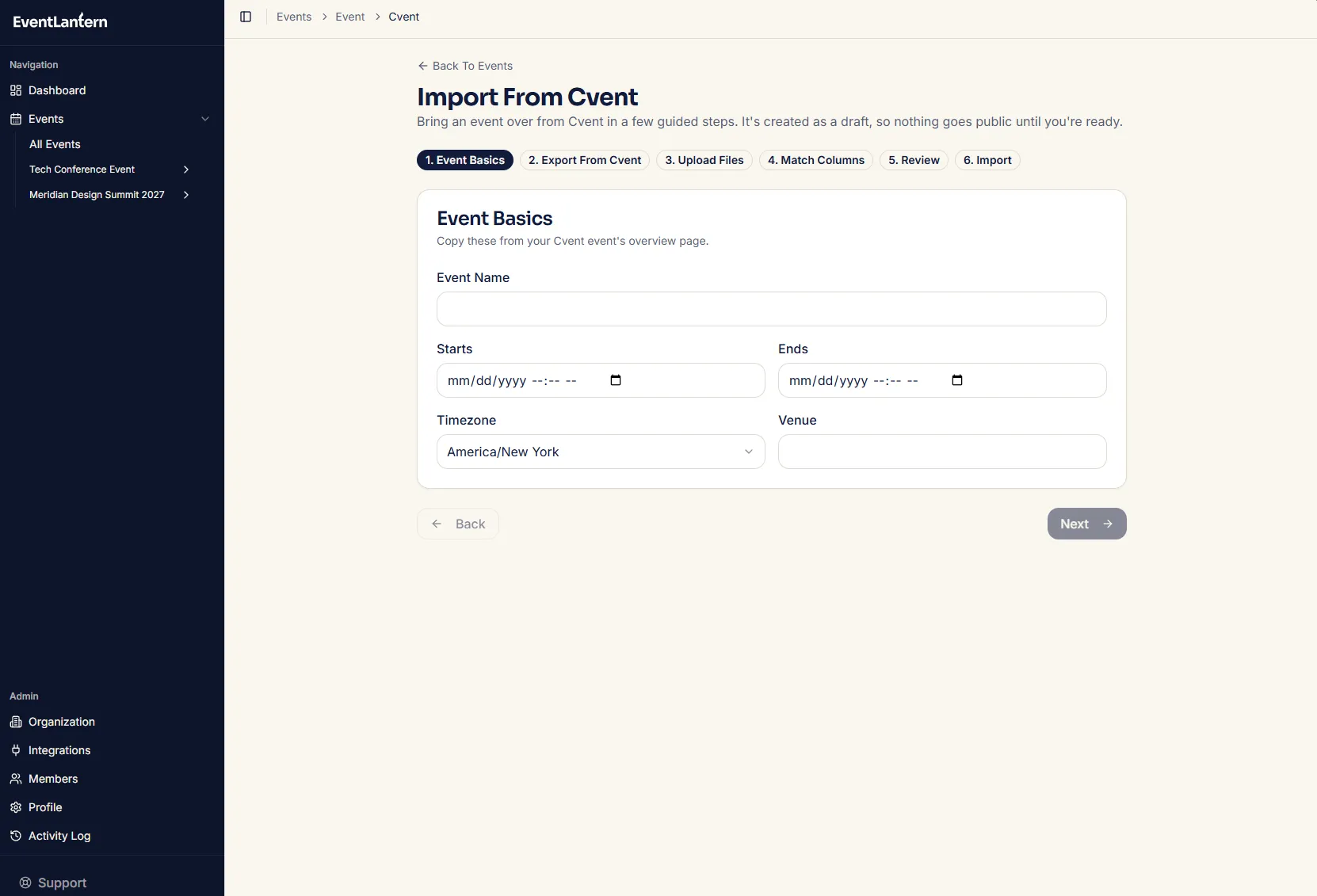
Admins see an Import From Cvent button on the Events page. Export your attendees, sessions and agenda, speakers, and sponsors and exhibitors from Cvent, upload the files, and EventLantern matches Cvent column names automatically.
Switch when it suits you
Because EventLantern is month to month, you can run a single event on it first, then decide.
Import from Cvent
Bring your Cvent event over in six steps.
-
1. Event basics
Enter the event name, dates, timezone, and venue.
-
2. Export from Cvent
Follow the step-by-step export instructions for attendees, sessions and agenda, speakers, and sponsors and exhibitors. Each has a sample file to download.
-
3. Upload files
CSV or Excel, up to 10 MB and 5,000 rows per file.
-
4. Match columns
Cvent column names are matched automatically. You can correct any match.
-
5. Review
See how many of each type will come in and preview the first rows. Rows that will be skipped, such as those with no email, are listed, and attendees with the same email are combined.
-
6. Import
EventLantern creates the event as a draft and links you to it.
What to know before you import
- No emails are sent. Imported attendees, speakers, and sponsors are not notified.
- Sponsor and exhibitor tiers are created at $0, so set your prices afterward.
- Plan limits apply. Sponsors and exhibitors need a paid plan that includes them, and the event counts toward your plan’s event limit.
- Cvent’s exports do not include speaker photos, so add those afterward.
- All or nothing. If an import fails partway, nothing is saved.
Questions, answered.
What is a good Cvent alternative for conferences?
EventLantern is an event management platform for corporate conferences, workshops, and meetups. It combines registration, ticketing, scheduling, speakers, sponsors, exhibitors, check-in, virtual and hybrid events, and analytics in one dashboard, with public pricing from free to $249 per month.
Is there a free alternative to Cvent?
EventLantern has a free plan for one active event with up to 50 attendees and no credit card required. Paid plans start at $49 per month. Cvent does not list a public free plan.
How much does Cvent cost?
Cvent does not publish its prices, so a quote is required. Third-party sources describe a model of an annual license plus per-registrant fees and implementation, with estimates of roughly $20K to $79K+ per year and about $7 to $12 per registrant per event. These are estimates from competitors and review sites, not Cvent prices.
Can EventLantern handle enterprise conferences?
EventLantern supports multi-track scheduling, speaker management, sponsor and exhibitor operations, lead capture, role-based collaboration, analytics, and integrations including Salesforce and HubSpot, with up to 5,000 attendees per event on Professional. EventLantern does not offer SSO, API access, or a custom app, and attendees use it as a mobile website. For events beyond that scale, programs that require SSO, API access, or a custom app, or programs that need a long-established vendor, Cvent may be the better fit.
How do I switch from Cvent to EventLantern?
Use the Import From Cvent button on the Events page. Export your attendees, sessions and agenda, speakers, and sponsors and exhibitors from Cvent, upload them as CSV or Excel files (up to 10 MB and 5,000 rows each), review the column matches, and EventLantern creates the event as a draft. No emails are sent to imported attendees. Speaker photos are not included in Cvent exports, so add those afterward.
Also comparing Bizzabo? See the Bizzabo alternative page.
Switching from Cvent? Get migration help.
Tell us about your event and what you use today. We will reply on business days with a plan for moving over.
See your whole event in one place.
Create your first event without a sales call or a credit card.
Cvent is a trademark of Cvent, Inc. EventLantern is not affiliated with or endorsed by Cvent. Information about Cvent comes from public sources and third-party reports as of October 2026 and may have changed. Check with the vendor for current terms.